Set Up Your Family Circle in Under 10 Minutes
Every Feature, Explained
Raksha's whole point is peace of mind for every phone in the family — one calm Family Circle for everyday life and the moments that matter. Setting it up takes less time than making chai. Here's everything you'll have running once you do.
August 2026 · 6 min read
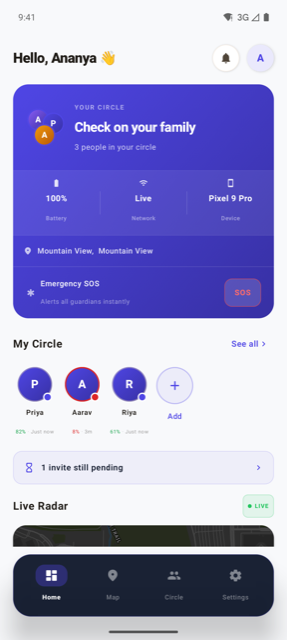
The Home screen once your Family Circle is set up — circle status, battery, and SOS in one glance.
Welcome to the Raksha Family
Joined by thousands of families across India — all staying connected, one Family Circle at a time.
Start With Your Family Circle — Two Minutes, and Everything Else Follows
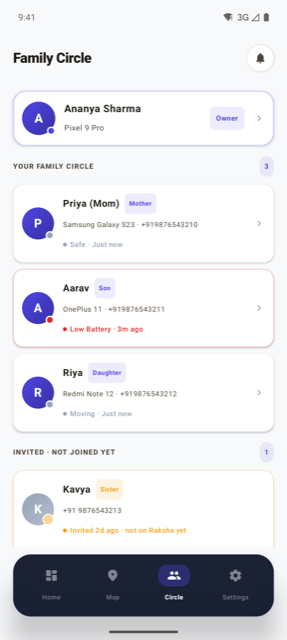
The Family Circle is the one thing every other feature depends on, so it's the right place to start. Send an invite to each family member you want in the circle; they'll only join once they accept it on their own screen, which means the circle only ever contains people who chose to be there. Once two or more members are in, the rest of Raksha — the live map, safe zones, alerts, SOS — automatically knows who to include. This is also the moment the actual promise of Raksha kicks in: not another app to check, just one calm place where your family looks out for each other.
Turn On the Live Map, Then Basically Forget About It
With the circle set up, each member's status becomes visible on a shared map — not to be stared at, but to be glanced at the moment a question like "did she leave yet?" comes up. This is the feature that quietly replaces the most phone calls: instead of asking, you just know. Most families check it a handful of times a day at most, usually without even opening the app on purpose.
Add a Few Safe Zones So You're Never the One Checking
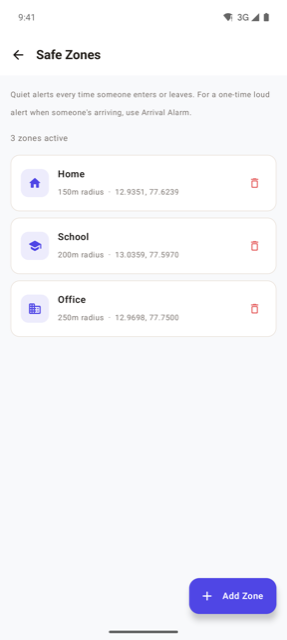
Mark the places that actually matter — home, school, office, a grandparent's house — as Safe Zones, and Raksha will nudge the circle automatically the moment someone arrives or leaves. This is the feature that replaces "text me when you reach" as a daily habit. Two or three zones takes under a minute each, and it's just as quick to add more later once you see which ones you actually use.
Use an Arrival Alarm for the One-Off Trip a Safe Zone Doesn't Cover
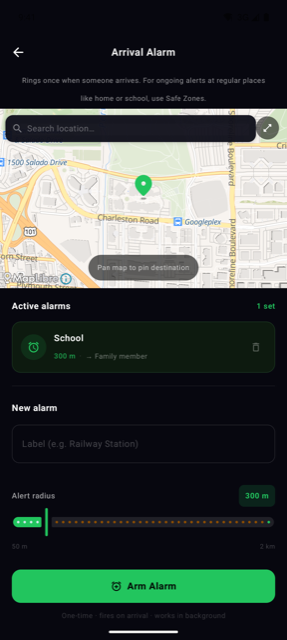
Safe Zones are for the places you check on every day. For everything else — a first solo train ride, a cab to the airport, a friend's house that isn't worth adding as a permanent zone — set a one-time Arrival Alarm instead. It fires once, the moment that specific trip ends, and there's nothing left to remove afterward.
Turn On Battery Alerts and Try One Check-In
Turn on low-battery alerts so the circle gets a heads-up before a family member's phone dies during an evening commute, not after. Then try a check-in once — a one-tap way to share your status or ask a family member to share theirs, useful for the odd day a safe zone doesn't quite cover, like a friend's house that isn't on the map yet.
Know Where Ring, Flashlight, SOS, and Lost Mode Live — Even If You Never Need Them
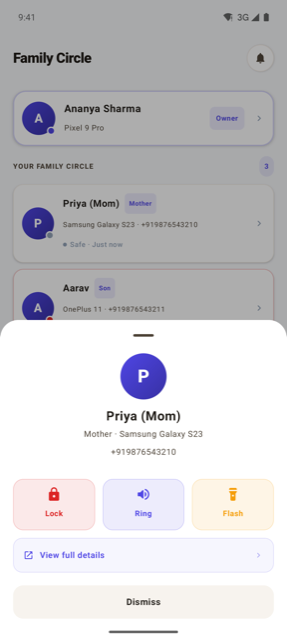
The last set of features is the one you'll use least often and be gladdest to have set up: Ring (full volume, even on silent) and Flashlight for a phone lost somewhere in the house, Lost Mode for remotely locking a phone and leaving a return message, and SOS to reach your whole circle in one tap if something genuinely comes up. None of it needs daily attention — just take a minute now to find where each one lives in the app, so you're not learning it for the first time in a moment that actually needs it.
One Calm Family Circle, for Every Day and the Moments That Matter
All of it comes down to one thing: closing the small gaps that used to need a phone call to fill, so your family can stay connected without it feeling like effort. From the moment your Family Circle is set up, that's really all Raksha should feel like: one calm place quietly giving your family peace of mind, whether it's an ordinary Tuesday or a day something actually needs attention.
Families Who Set This Up
Parents, spouses, and grown-up kids — real stories from families using their Family Circle every day.
"నాకు చాలా anxiety ఉంటుంది మావారు దూర పనిమీద వెళ్ళినప్పుడు. Raksha install చేసాక location ఎప్పుడూ చూడగలుగుతున్నాను. ఒక రాత్రి ఆలస్యంగా వస్తున్నారు, phone తీయడం లేదు — Raksha లో చూసాను, bus stand దగ్గర ఉన్నారు. చాలా relief అయింది."
— I used to get very anxious when my husband went far for work. After installing Raksha, I can always see his location. One night he was late and not picking up — I checked Raksha, he was near the bus stand. What a relief.
"મારા પપ્પાને ઘણી ચિંતા થતી. Raksha install કર્યા પછી તેઓ map જુએ છે. Emergency button પણ છે — એક વાર use કર્યું, તરત message ગયું."
— My dad used to worry a lot. After installing Raksha he checks the map. There's an emergency button too — I used it once and the message went instantly.
"आमचा मुलगा परगावी शिकतो. Raksha मुळे त्याचा location कधीही बघू शकतो. एक वेळा तो respond करायला उचकला नाही — map पाहिला, निर्वांत वाटलं."
— Our son studies in another city. Raksha lets us check his location anytime. Once he didn't respond quickly — I checked the map and felt reassured.
"আমার মেয়েকে একা school-এ যেতে দিই। Raksha-তে location দেখি, নিজেই map follow করি। একবার সে auto-তে ভুল রাস্তা নিয়েছিল — আমি তুরন্ত দেখতে পেলাম।"
— I let my daughter go to school alone. I watch her location on Raksha, follow the map myself. Once the auto took a wrong route — I saw it immediately.